Filing online is fast and easy. Follow the steps below to create an account, file for benefits, and manage your account online.
Create your account
First, create an account on Hawaii unemployment insurance (UI) claims website (https://huiclaims.hawaii.gov). You’ll need an email address to do this.
A few minutes after creating your account, you’ll get an email with a temporary password. After you receive this email, return to our website to create a permanent password and file for benefits.
Make sure you have all the following information at hand and that it is correct. Once you submit your application, you will not be able to update it.
Social Security number
Bank account number and routing number. Use your bank routing number and account information on your personal check. If you want to use a savings account, ask your bank for this information.
Your employment information for the past 18 months, including:
Employer’s name, address, and phone number
Dates of employment
Reason for separation
Alien registration number or I-94 or unexpired passport number (if you are not a U.S. citizen)
File your weekly or biweekly claims
After you apply for unemployment insurance or reopen a claim, you must file a claim for each week you want to receive benefits. You must submit claims online at Hawaii unemployment insurance claims website: https://huiclaims.hawaii.gov/.
Log in to your account.
Choose “Claim Certification.”
Follow the instructions to file claims for the applicable weeks.
Check your answers carefully before filing your claim. Once you file, you cannot change them. If you think you made a mistake, call us or submit a contact form on our website (https://labor.hawaii.gov/ui/contact/).
Due dates for weekly claims
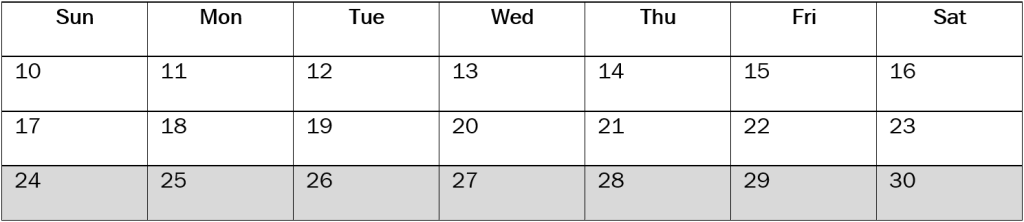
Weekly claims are due within 7 days after the last day of the week (Saturday). Example: You are filing for the week that started on Sunday, 8/17 and ended on Saturday, 8/23. You have seven days, 8/24 through 8/30 (shown in gray), to file your weekly claim.
Due dates for biweekly claims
A biweekly claim covers the past two weeks, starting on Sunday in the first week and ending on Saturday in the second week.
When filing a biweekly claim, you must file for each week separately.
Biweekly claims are due within 7 days after the last day of the second week (Saturday).
Example: You are filing for two weeks, starting on Sunday, 8/10 and ending on Saturday, 8/23. You have seven days, 8/24 through 8/30 (shown in gray), to file your biweekly claim.
IMPORTANT: When filing a biweekly claim, you must file for each week separately. Submit the first week, then the second week. If you do not file for both, you may not get paid for two weeks.
Keep track of deadlines
You can download a list of due dates for filing claims from the confirmation page or the email confirmation we send you.
You can also visit our website and choose “Claim Inquiry” or “My Claim Status” to see when your next claim is due.
Write important dates on a calendar or set reminders on your phone so you do not miss due dates for filing claims and get paid on time.
If you stop filing claims
If you do not file claims for two or more weeks in a row, you must reopen your claim to keep filing. Your benefits may be denied until you reopen your claim. Log in to your claimant portal and select “Additional Claim” or “Reopen Claim.”
Manage your account
You can check information about your claim and update your account online. Log in to your account then go to “Manage My Account” and choose “Claim Inquiry.” From there, you can:
See your payments
Check the claims you filed
Find out why a week is pending
View your filing schedule
Change your mailing address
Update your profile
Get help in your language
If you need free help to understand this document in your language, please contact us using the information below.
Unemployment Insurance (UI) Call Center (808) 762-5752 or (833) 901-2272 (toll-free)
Oahu Claims Office 830 Punchbowl St Room 110 Honolulu, HI 96813-5080
Hilo Claims Office 1990 Kinoole St Room 101 Hilo, HI 96720-5293
Kona Claims Office Ashikawa Building 81-990 Halekii St Room 2087 Kealakekua, HI 96750-0167
Maui Claims Office 54 South High St Room 201 Wailuku, HI 96793-2198
Kauai Claims Office 4370 Kukui Grove St Suite 3-214 Lihue, HI 96766-2001
Unemployment Insurance
ESPAÑOL: SPANISH
You have the right to an interpreter at no cost to you.
Dominio de Inglés Limitado Asistencia
Las personas que no hablan Inglés como su idioma principal y que tienen una capacidad limitada para leer, hablar, escribir o entender en Inglés tienen derecho a la asistencia lingüística con respecto a la recepción de los beneficios del seguro de desempleo.
Si usted necesita ayuda con la declaración de prestaciones por desempleo o si necesita más información sobre el desempleo, por favor informe a la oficina local de reclamaciones. Servicios de intérprete gratis disponibles. Las direcciones y información de contacto para Hawaii Seguro de Desempleo División oficinas locales de reclamaciones se enumeran a continuación.
Cómo Aplicar:
Usted puede solicitar en línea, por teléfono.
• Para solicitar en línea, vaya a uiclaims.hawaii.gov (Inglés solamente). Debe seguir todas las instrucciones de la página de confirmación al final.